Introduction to Routers
The question “what is a router” often arises when learning how devices communicate beyond their own local network. A router connects distinct networks and directs data packets from one network toward destinations on another.
Routers are relevant whenever data must move between separate network segments. They examine destination information, consult known routes, and choose where to send each packet next.
What Is a Router?
A router is a device or computer that serves as a gateway between networks. It operates at the network layer, which is the part of networking responsible for directing packets across interconnected networks.
A packet is a unit of data prepared for transmission across a network. The router examines the packet’s network-layer destination address, usually an Internet Protocol address, and uses that information to decide whether and where the packet should be forwarded.
This forwarding role distinguishes a router from an ordinary end device. Although both hosts and routers can send and receive Internet Protocol packets, a router implements forwarding processes that move packets toward other networks.
Why Routers Matter
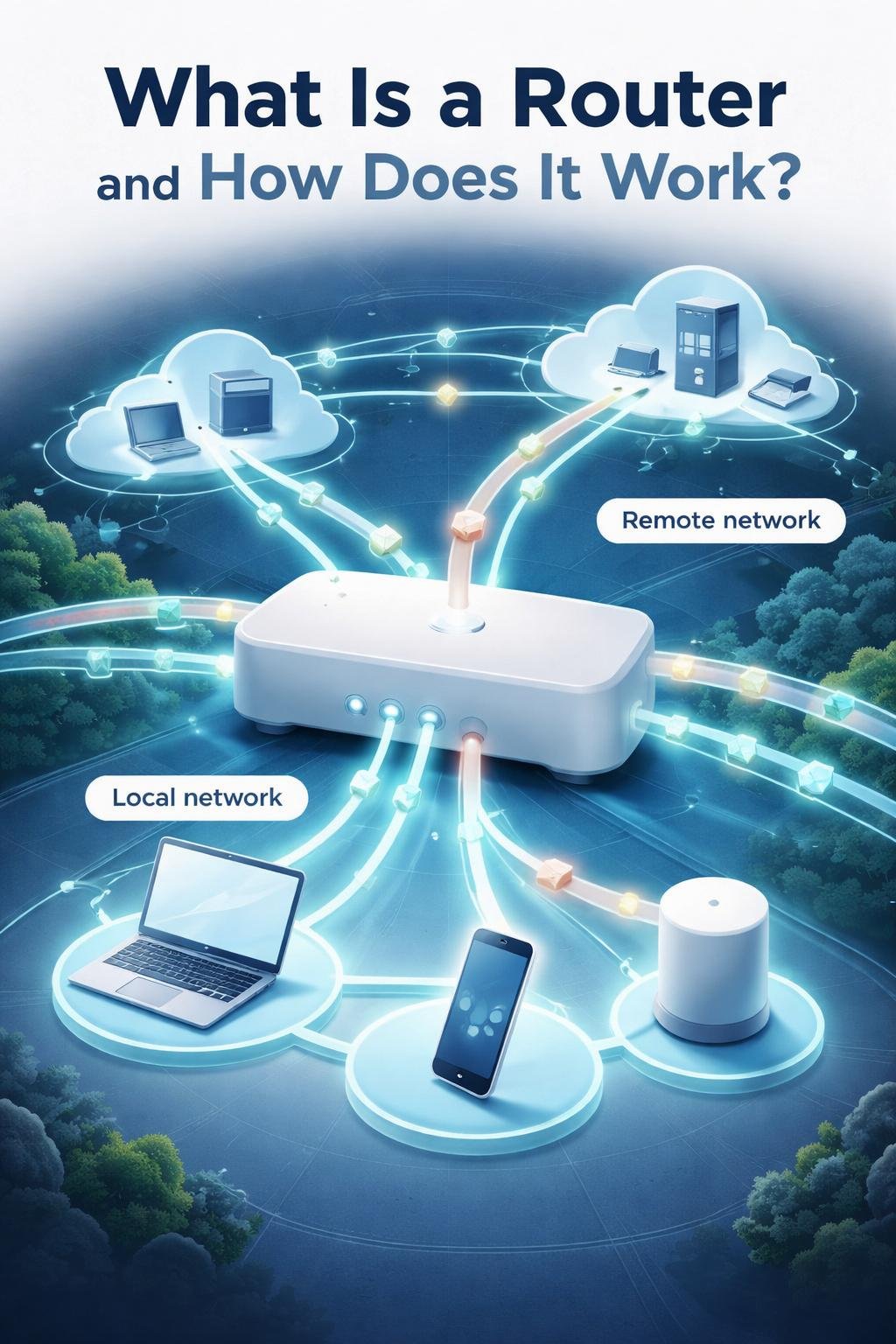
A device can communicate directly with destinations on its own network segment according to the rules of that network. When the destination is on a different network, the packet generally needs a router to direct it beyond the local segment.
Routers make communication between distinct network segments possible by selecting a path toward a remote destination. In this way, a local network can connect to broader networks rather than operating as an isolated group of devices.
Routers also separate network-layer connections and broadcast domains. This means traffic intended for one local broadcast domain is not automatically treated as though every connected network were a single local segment.
How a Router Directs Data

- The router receives a packet. The packet arrives through an incoming network interface with a link-layer header used on the current network link.
- It examines and validates the IP header. The Internet Protocol header contains information needed for network-layer processing, including the destination address. If the header is not valid for processing, the router cannot simply forward it as an ordinary valid packet.
- It decides between local delivery and forwarding. The router determines whether the packet is addressed to the router itself or must continue toward another destination.
- It consults known routes. The router compares the destination address with entries in its routing table.
- It selects a next hop and outgoing interface. The next hop is the next router or destination toward which the packet should be sent. The outgoing interface is the router connection used to transmit it.
- It updates forwarding information. The router reduces the packet’s Time to Live, or TTL, for IPv4, or its hop limit where applicable. It also performs any required checksum update.
- It replaces the link-layer header. The header used on the incoming link is removed or replaced with one suitable for the next network link.
- It transmits the packet. The prepared packet leaves through the selected outgoing interface and travels to the next hop.
This process can occur at multiple routers before the packet reaches its destination network.
Key Router Components and Functions
Destination addresses
A destination address identifies where a packet is intended to go at the network layer. The router uses this address for route lookup rather than choosing an outgoing path at random.
Routing tables
A routing table is a collection of known routes. Its entries help the router determine which next hop and outgoing interface are appropriate for a destination.
Longest-prefix matching
More than one routing-table entry may match a destination address. Longest-prefix matching is the lookup method used to select the most specific matching route.
Next hops and interfaces
A next hop is the next network-layer destination along the selected route. An interface is a router’s connection to a network segment. Packets arrive through incoming interfaces and leave through selected outgoing interfaces.
Static routes and routing protocols
A static route is entered through configuration rather than learned through an exchange with other routers. Routing protocols, by contrast, allow routers to exchange information about which destinations are reachable.
Control plane and packet forwarding
The control plane builds and maintains routing information, including information learned through routing protocols. Packet forwarding uses that information to process individual packets and send them through appropriate outgoing interfaces. Route learning and packet forwarding are related functions, but they are not the same task.
Everyday Examples of Router Use
Illustrative example: Leaving a local network
Suppose a computer creates a packet for a destination outside its local network. The packet is sent toward a router. The router reads the destination address, finds a matching route, selects a next hop, prepares the packet for the outgoing link, and transmits it toward the remote network.
This is a hypothetical teaching example. The exact connections, interfaces, and available features depend on the equipment and network configuration.
Illustrative example: Connecting network segments
Imagine that one organization has two distinct network segments joined by a router. A packet from a device on the first segment is addressed to a device on the second. The router receives the packet on one interface and, after performing its forwarding checks, sends it through the interface connected toward the second segment.
This example demonstrates the router’s network-layer role without implying that every router product has the same physical ports, controls, or software interface.
Benefits and Limitations of Routers
| Area | Practical meaning |
|---|---|
| Connecting networks | A router allows packets to move between distinct network segments. |
| Route selection | It uses destination information and known routes to choose a next hop and outgoing interface. |
| Broadcast-domain separation | It prevents separate network segments from being treated as one shared broadcast domain. |
| Dependence on routing information | A router needs an applicable route or other valid forwarding decision for the destination. |
| Dependence on packet validity | Packet headers must be suitable for the router’s required processing. |
| Dependence on configuration and reachability | Incorrect configuration or an unreachable next hop can prevent successful forwarding. |
A router can direct traffic only with the information and connections available to it. Its presence does not guarantee that every destination is reachable or that every packet can be delivered.
Common Router Misunderstandings

A router and a switch are not identical
Switches and bridges generally forward link-layer frames within a broadcast domain. Routers perform network-layer forwarding between distinct network segments. Some products may combine several networking functions, but the underlying roles remain different.
A router does not merely pass a packet through unchanged
During forwarding, a router examines the network-layer header, reduces the TTL or hop limit, performs any required checksum update, and replaces the incoming link-layer header with one appropriate for the next hop.
Not every networking device routes packets
A device may connect equipment or forward frames without implementing network-layer forwarding between separate networks. A router is distinguished by its forwarding decisions based on network-layer information.
DigiNana Beginner Guide

Hypothetical educational example: DigiNana follows a packet created by a local computer for a destination on a remote network. The computer sends the packet toward its router because the destination is not on the same local network.
The router receives the packet and examines its IP header. It determines that the packet is not for local delivery to the router, so it looks up the destination address in its routing table.
The matching route identifies a next hop and an outgoing interface. The router reduces the TTL or hop limit as required, updates any required checksum, and replaces the incoming link-layer header with a header suitable for the next link.
The router then transmits the packet. DigiNana’s story is only an illustration, but the destination lookup, next-hop selection, header handling, and forwarding steps reflect the verified technical process.
Practical Tips

- Consider whether the destination is local or remote. Communication with a remote network generally depends on a working route through a router.
- Check physical connections. Confirm that required cables and power connections are secure before changing configuration settings.
- Review available status information. If the device provides status indicators or a management interface, consult its official documentation to understand what they mean.
- Avoid guessing at routing settings. Incorrect routes or interface settings can prevent packets from reaching their intended networks.
- Use current official instructions. Router interfaces, terminology, and configuration procedures vary by device and may change over time.
Begin with simple connection checks and reliable documentation before altering routing or security-related settings.
Router Security and Privacy Considerations
Router configuration can affect which traffic is forwarded between networks. Routers may also support packet filtering, but the controls and capabilities available vary by device and configuration.
Do not assume that the presence of a router provides a particular level of protection. For security-related settings, use current official documentation for the specific device or service and verify the effect of a change before relying on it.
Frequently Asked Questions
Is a router the same as a switch?
No. A router performs network-layer forwarding between distinct networks. A switch or bridge generally forwards link-layer frames within a broadcast domain, although one physical product may combine multiple functions.
What information does a router examine?
A router examines the packet’s network-layer header, including its destination address. It also performs the header checks and updates required for forwarding.
What does a routing table do?
A routing table stores known routes. The router consults it to select a matching route, next hop, and outgoing interface for a packet’s destination.
What is a next hop?
A next hop is the next router or destination to which the current router sends a packet along its selected route.
Can routes be static or learned automatically?
Yes. Routes may be configured as static routes, and routers may also use routing protocols to exchange reachability information with neighboring routers.
Why does the link-layer header change?
The incoming link-layer header applies to the link on which the packet arrived. Before retransmission, the router prepares a new link-layer header appropriate for the next hop on the outgoing link.
Final Takeaway
Routers connect distinct networks and forward IP packets toward remote destinations. For each packet, a router examines destination information, consults known routes, selects a next hop and outgoing interface, performs required forwarding updates, and prepares the packet for the next network link.
A router depends on valid packet information, suitable routes, reachable next hops, functioning interfaces, and correct configuration. Understanding these basic relationships makes it easier to interpret network connections and troubleshoot them carefully.
References
- Router | IEEE Technology Navigator: https://technav.ieee.org/topic/router/.
- RFC 1812 – Requirements for IP Version 4 Routers: https://datatracker.ietf.org/doc/rfc1812/.
- router – Glossary | CSRC: https://csrc.nist.gov/glossary/term/Router.
These verified sources support the router definitions and forwarding concepts explained in this article.
Image Credits
The five DigiNana Wiki visuals accompanying this article are original educational illustrations created with AI assistance. They are conceptual learning aids and must not be interpreted as verified photographs, exact software interfaces, actual device specifications, or guaranteed technical configurations.
Disclaimer
This article provides general educational information. Technical information, router interfaces, product features, security conditions, and service availability can change or vary among devices, networks, and providers. Verify important configuration and security details using current official documentation for the relevant equipment or service.